

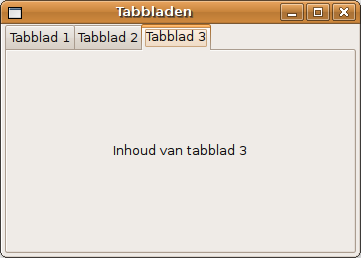
Tab (interface)
User interface component that allows multiple documents to be contained within a single window
In interface design, a tab is a graphical user interface object that allows multiple documents or panels to be contained within a single window, using tabs as a navigational widget for switching between sets of documents. It is an interface style most commonly associated with web browsers, web applications, text editors, and preference panels, with window managers and tiling window managers.
Nº Q849450 ★★
Uncommon · Knowledge
Tab (interface)
User interface component that allows multiple documents to be contained within a single window
In interface design, a tab is a graphical user interface object that allows multiple documents or panels to be contained within a single window, using tabs as a navigational widget for switching between sets of documents. It is an interface style most commonly associated with web browsers, web applications, text editors, and preference panels, with window managers and tiling window managers.
From Wikipedia
In interface design, a tab is a graphical user interface object that allows multiple documents or panels to be contained within a single window, using tabs as a navigational widget for switching between sets of documents. It is an interface style most commonly associated with web browsers, web applications, text editors, and preference panels, with window managers and tiling window managers. Tabs are modeled after traditional card tabs inserted in paper files or card indexes (in keeping with the desktop metaphor). They are usually graphically displayed on webpages or apps as they look on paper. Tabs may appear in a horizontal bar or as a vertical list. Horizontal tabs may have multiple rows. In some cases, tabs may be reordered or organized into multiple rows through drag and drop interactions. Implementations may support opening an existing tab in a separate window or range-selecting multiple tabs for moving, closing, or separating them.
Text: Wikipédia, CC BY-SA 4.0. · Image: Simeon87 (CC BY-SA 3.0) ·
Related cards
-
R
Ribbon (user interface)
Graphical user interface element
Nº Q1070358 ★★
Not listed
-

Tab character
C0 control character, used for tabulations; commonly entered by the tab key; considered whitespace
Nº Q26772372 ★
Not listed
-

Table (format)
Arrangement of data in rows and columns
Nº Q496946 ★★★
Not listed
-

Tablet computer
Mobile computer with integrated display, circuitry and battery
Nº Q155972 ★★★
Not listed
-
S
Status bar
User interface element
Nº Q586462 ★
Not listed
-

Graphical user interface
User interface allowing interaction through graphical icons and visual indicators
Nº Q782543 ★★★
Not listed